
Agentic Rollout
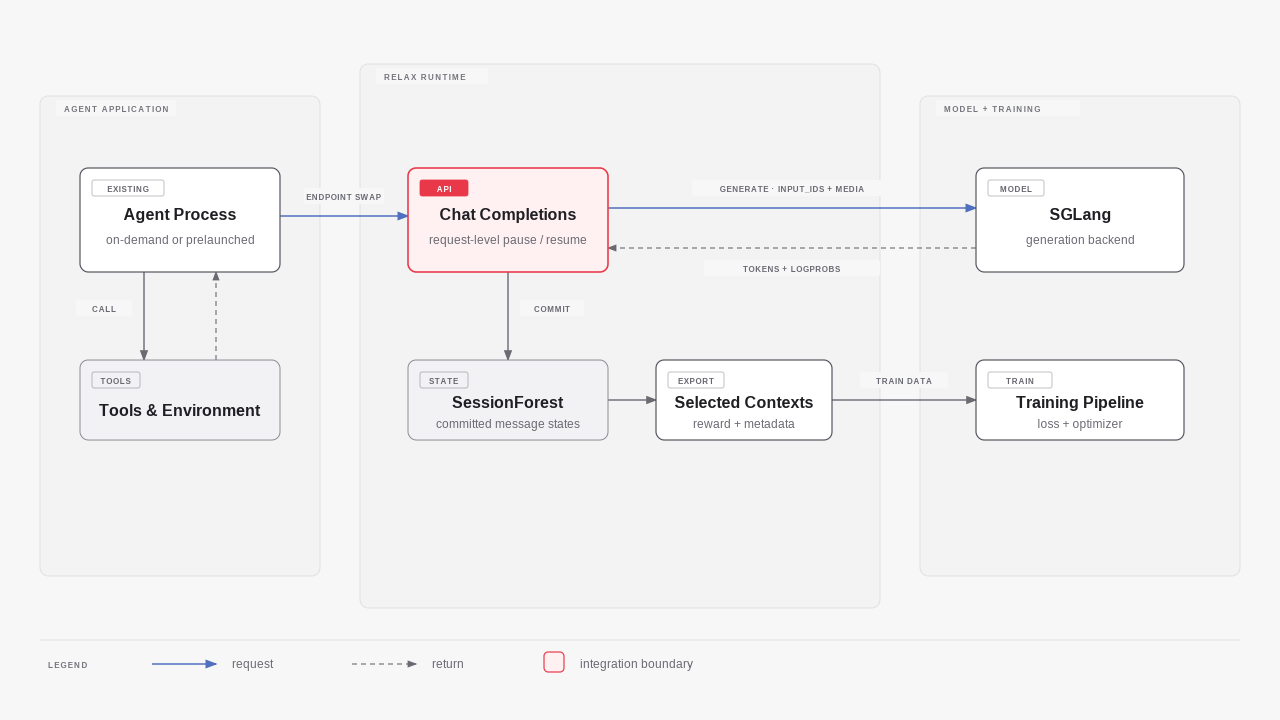
Agentic rollout connects an existing agent app (harness) to Relax training. For each Session, Relax starts and supervises an agent process that runs the existing harness. Relax records committed conversations and turns selected contexts into training samples.
Agentic rollout is especially useful when you already have an agent application (harness) that calls an OpenAI-compatible Chat Completions API. Agents using OpenAI Responses or Anthropic Messages can also connect to Relax. The agent may run standalone or through a centralized execution platform.
Recommended workflow
For agent app (harness) assessment, integration, launch checks, and experiments, we recommend using the repository's agentic-rollout skill under skills/agentic-rollout/. It checks the current checkout and guides context topology, parsers, export and advantage, timeouts, concurrency, and runtime evidence by stage. Experiments still require explicit user authorization, and this guide remains the contract reference for model API request and response formats, APIs, and export.
For manual reading:
- To start from an existing agent, read Prepare Your Agent, then Connect Your Agent.
- For multi-agent training, exporting several contexts, or defining per-context advantage, read Choose Training Contexts and Scores.
- To tune concurrency or cross-step execution, read Configure Runtime Behavior.
- To learn how SessionForest and scheduling work, read Understand How Agentic Rollout Works.
Core Capabilities
Agentic RL with existing agents Connect an existing agent app (harness) through Chat Completions, Responses, or Messages by changing its model endpoint.
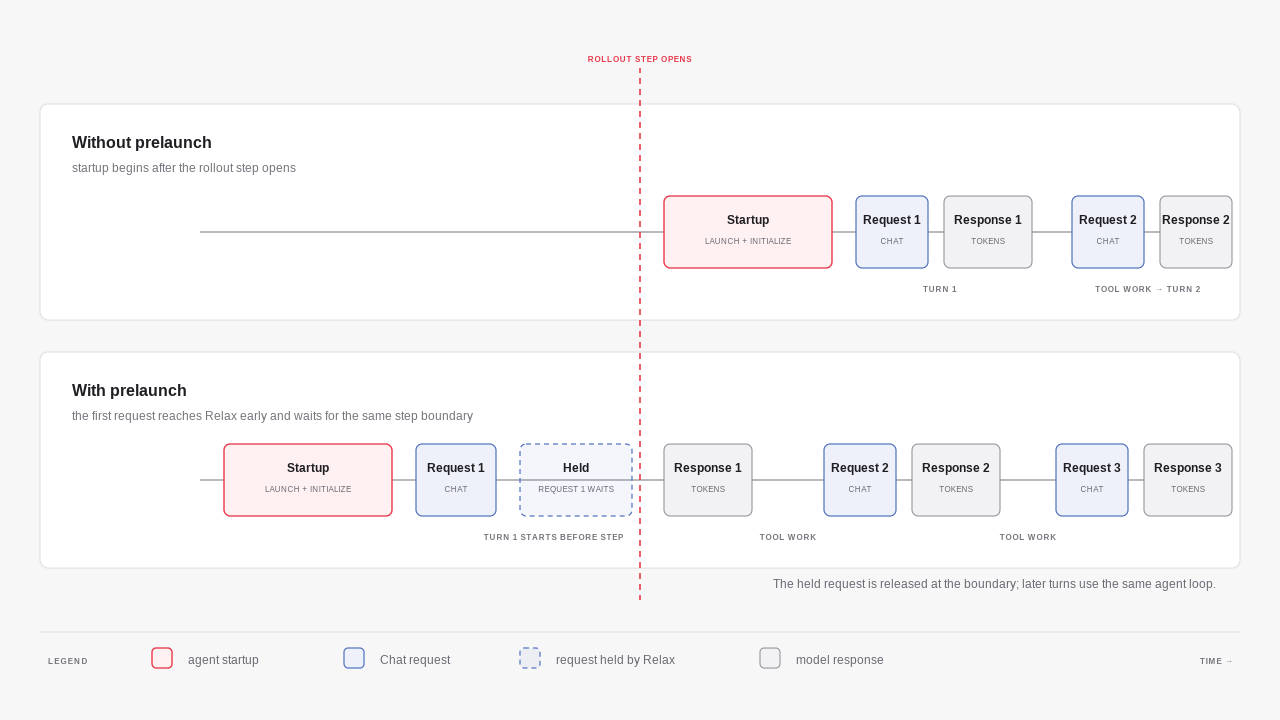
Agent process warmup Start agent processes early to hide application, tool, and environment initialization time.
Request-level partial rollout Interrupt and resume model generation across rollout steps without requiring changes to the agent.
Prepare Your Agent
Run the agent outside Relax first. Use its normal task input and model endpoint. Before continuing, confirm that it can:
- accept one real task through its normal input interface;
- call one supported model endpoint;
- complete a full harness run, including multiple turns when needed;
- write a final result;
- exit without an error.
Keep the task input, model endpoint, API credential, and result output configurable. The harness should behave the same after integration. Relax supplies new input, endpoint, and output boundaries around it.
For each Session, Relax starts a process as the agent's entry point. This process can run the agent directly, start child processes, or submit the task to another machine or a centralized platform. Where the agent runs does not matter, as long as its requests reach RELAX_BASE_URL. The process stays running until the task finishes, then exits.
Remote centralized agent platforms
If your agent submits work to a centralized remote platform instead of running directly on the local machine, and that platform limits agent concurrency, you must read Configure Runtime Behavior before launch.
Connect Your Agent
Dataset and Session Input
Relax writes each task to the file named by RELAX_INPUT_JSON. The file can contain messages, metadata, or both. This example provides ready-to-use messages:
{
  "messages": [
    {"role": "system", "content": "You are a helpful research assistant."},
    {"role": "user", "content": "Which city hosted the event?"}
  ],
  "metadata": {
    "task_id": "example-001"
  }
}
Text and Message Input
The standard dataset path maps --input-key to messages. A string becomes one user message. A message list keeps its OpenAI message shape.
Metadata-Only Tasks
--metadata-key maps a dataset object to metadata. A harness can read the task from metadata and construct the messages when it runs.
Multimodal Input
Keep the existing Relax dataset format
Prepare image data in the same way as other Relax multimodal training. Put an <image> placeholder in the prompt or message content, keep the image path, URL, or binary value in a separate dataset field, and map that field with --multimodal-keys. Agentic rollout converts this input to OpenAI image_url format before the agent process reads it.
For example, a dataset row can use the normal Relax format:
{
  "input": [{"role": "user", "content": "<image>Describe this image."}],
  "images": ["/path/to/image.png"]
}
Map the image modality to the dataset field:
--multimodal-keys '{"image":"images"}'Each image in images must have one matching <image> placeholder. The standard Relax data path joins the placeholders with the image values and creates internal image items. Agentic rollout then adds the process-boundary conversion to OpenAI image_url. The dataset itself does not need to store image_url objects. This placeholder and field-mapping path applies to the initial input prepared from the dataset.
| Stage | Image processing |
|---|---|
| Standard Relax dataset path | --multimodal-keys inserts the dataset image into the prompt and extracts model media inputs |
| Agentic Session Input | Before the process starts, Relax converts each internal image item to OpenAI image_url content |
| Agent model request | Relax reads image_url, prepares backend media for SGLang, and builds processor-expanded training inputs |
At the process boundary, an existing data:image/..., http://, or https:// URL is kept. A local path, byte payload, or in-memory image is loaded, converted to RGB PNG, and encoded as a data URI.
Images in messages use the OpenAI image_url content shape:
{
  "role": "user",
  "content": [
    {"type": "image_url", "image_url": {"url": "data:image/png;base64,<base64-data>"}},
    {"type": "text", "text": "Describe this image."}
  ]
}
Initial dataset images arrive in this shape automatically. An agent that adds images in later turns must create the same shape directly in messages; later observations do not go through dataset placeholders or --multimodal-keys. Tool observations can also contain image_url items. See examples/deepeyes_agentic/app/env_deepeyes.py for a complete multi-turn example, and see Token-in, Token-out for the inference and training token views.
Minimal Agent Application
This example receives ready-to-use messages, makes one model call, and exports the final conversation. A metadata-driven harness can construct messages after reading metadata. A real agent can keep its existing tool loop and make more calls with the same client.
import asyncio
import json
import os
from pathlib import Path

from openai import AsyncOpenAI


async def main() -> None:
    session_input = json.loads(Path(os.environ["RELAX_INPUT_JSON"]).read_text(encoding="utf-8"))
    messages = session_input["messages"]

    client = AsyncOpenAI(
        base_url=os.environ["RELAX_BASE_URL"],
        api_key=os.environ["RELAX_SESSION_ID"],
        timeout=9999,
    )
    response = await client.chat.completions.create(
        model="model",
        messages=messages,
    )
    messages.append(response.choices[0].message.model_dump())

    output = {
        "metadata": {"task_success": 1.0},
        "reward": 1.0,
    }
    Path(os.environ["RELAX_OUTPUT_JSON"]).write_text(
        json.dumps(output, ensure_ascii=False),
        encoding="utf-8",
    )


asyncio.run(main())
The timeout=9999 above is the wall-clock timeout for one model request sent to RELAX_BASE_URL. A single request may be held during prelaunch, partial-rollout abort and resume, or fully-async execution, so configure this client timeout to cover the longest such wait.
Keep the complete assistant message returned by model_dump(). Reasoning content and tool calls can then be used by later turns and by SessionForest matching.
Model APIs
Relax accepts Chat Completions requests and the Responses and Messages request shapes described below. All three use the same generation and SessionForest core. Every endpoint authenticates with Authorization: Bearer <RELAX_SESSION_ID>.
| Interface | Endpoint | Complete-history field | Turn limit |
|---|---|---|---|
| OpenAI Chat Completions | /v1/chat/completions | messages | max_completion_tokens, or legacy max_tokens |
| OpenAI Responses | /v1/responses | typed input Items | max_output_tokens |
| Anthropic Messages | /v1/messages | system and messages | required max_tokens |
Sending requests without a standard client
Pass RELAX_BASE_URL unchanged to standard clients; they append their own resource paths. For direct HTTP requests, use RELAX_BASE_URL.rstrip("/") + endpoint, where endpoint comes from the table above. Preserve the existing service path: URL helpers that resolve a leading / from the origin may discard /agentic_api.
Current API limits
Model requests must use HTTP. Omitting stream or setting it to false returns JSON; stream=true uses Buffered SSE and emits model-content events after the complete generation finishes. WebSocket and token-level streaming are not supported. Every request must replay the complete history for its conversation branch. Responses requests must include the complete input; Relax does not use previous_response_id.
Relax normalizes requests from all three interfaces to canonical messages, function tools, and chat_template_kwargs, then uses that state for SessionForest matching and generation. The API response is rendered in the interface used by the request. The model field is echoed in the response and does not select the Relax inference backend. Request fields outside the tables below do not alter generation.
Chat Completions
The training configuration supplies temperature and top_p. Request values for these fields are ignored.
| Field | Behavior |
|---|---|
messages | Required complete history for one conversation branch |
tools | Tool definitions used by that branch |
chat_template_kwargs | Template arguments used by that branch |
max_completion_tokens | Maximum generated tokens for this turn |
max_tokens | Legacy alias for max_completion_tokens; the newer field takes precedence when both are set |
stop | Stop string or list for this turn |
seed | Sampling seed for this turn |
logprobs | Include generated-token logprobs in the response |
Chat Completions message contract
Use user, assistant, tool, or system roles. User, system, and tool messages require nonempty content; represent a tool result of None or "" with a stable nonempty value. Assistant messages may omit text content when tool calls or reasoning are present. Chat developer messages need a harness-side conversion to system. Relax manages add_generation_prompt, tokenize, and tools; do not set them in request chat_template_kwargs.
Pass tools and chat_template_kwargs on every request that uses them. Configure --agentic-reasoning-parser and --agentic-tool-call-parser when the model and chat template require them.
Responses
Relax projects these typed input Items:
| Item | Projection |
|---|---|
Top-level instructions string | Canonical system message before input |
message with user, assistant, system, or developer role | Canonical message; developer becomes system |
input_text / output_text | Message text |
User input_image with an image_url string | Canonical image_url content |
reasoning with readable summary or content text | Assistant reasoning_content |
function_call | Assistant function tool call with the same call_id |
function_call_output with text output | Tool message with the same call_id |
Responses function tools use the flat type, name, parameters, and optional description shape. Output reasoning, assistant text, and function calls become corresponding Responses Items. function_call_output accepts a string or input_text blocks. A length-limited result has status: "incomplete"; other successful results have status: "completed".
Anthropic Messages
Relax projects these Messages blocks:
| Block | Projection |
|---|---|
system string or text blocks | Canonical system message |
User or assistant text | Canonical message text |
User image with URL or base64 source | Canonical image_url content |
Assistant thinking | Assistant reasoning_content |
Assistant tool_use | Assistant function tool call with the same ID |
User tool_result with text content | Tool message with the same tool-use ID |
Messages tools use name, input_schema, and optional description; a missing tool type and type: "custom" are projected as canonical function tools. Anthropic responses use text, thinking, and tool-use blocks with Anthropic stop reasons. stop_sequences is passed to generation as the turn's stop strings.
Buffered SSE
Buffered SSE keeps the HTTP request open while the complete generation runs. Relax sends an initial connection frame and a heartbeat every 15 seconds while generation is pending. After completion, it emits the protocol's complete terminal event sequence together; it does not expose token-by-token deltas.
| Protocol | Terminal sequence |
|---|---|
| Chat Completions | One complete chat.completion.chunk with usage, then [DONE]; failures send OpenAI error data, then [DONE] |
| Responses | response.created, one response.output_item.done per output Item, then response.completed, response.incomplete, or response.failed |
| Messages | message_start, complete content-block events, message_delta, then message_stop; failures use event: error |
Chat and Responses use SSE comments for connection and heartbeat frames. Messages uses event: ping. JSON and Buffered SSE share the same normalized request, generation, SessionForest commit, usage accounting, and finish reason. Every successful Chat terminal chunk includes complete usage, independent of stream_options.include_usage; Relax does not emit a separate usage chunk.
Agent Process Contract
Relax injects these variables into every agent process:
| Variable | Meaning |
|---|---|
RELAX_INPUT_JSON | Session input JSON path |
RELAX_OUTPUT_JSON | Session output path |
RELAX_SESSION_IO_DIR | Per-session temporary directory |
RELAX_BASE_URL | Agentic model API base URL |
RELAX_SESSION_ID | Session ID and API credential |
RELAX_ROLLOUT_MODE | train or eval |
RELAX_GROUP_ID | Runtime Group ID |
The RELAX_ prefix is reserved. A shell launcher can map these values to an existing application interface:
#!/usr/bin/env bash

export OPENAI_BASE_URL="${RELAX_BASE_URL}"
export OPENAI_API_KEY="${RELAX_SESSION_ID}"

python -m my_agent \
    --input-json "${RELAX_INPUT_JSON}" \
    --output-json "${RELAX_OUTPUT_JSON}"
--agent-command names an executable and its arguments, with shell-style quoting. Relax starts it directly without a login shell. Put environment activation, variable expansion, pipelines and redirection in an explicit script, launched as bash run_agent_app.sh.
Pass application settings with --agent-env:
--agent-env FOO=bar BAZ=quxCleanup ownership
When an agent times out or its Group is dropped, Relax sends SIGTERM to the still-running root process started by --agent-command. If it has not exited after the grace period, Relax sends SIGKILL to that root process. A normal partial-rollout pause leaves the agent process running.
Whether it exits naturally or is terminated by Relax, agent-command is responsible for cleaning up its tools, subprocesses, containers, and remote jobs.
After the root exits, Relax makes a best-effort attempt to clean up remaining local processes. Cleanup failures produce warnings and do not block training.
Launch Training
Add these options to a working Relax training command:
--use-agentic-rollout \
--agent-cwd /path/to/agent_repo \
--agent-command "bash run_agent_app.sh"
Build a Recipe
Start from a working recipe with the same model and training mode. examples/search_r1/run_search_r1.sh is a local tool-agent example; examples/deepeyes_agentic/run_deepeyes_agentic.sh adds images; examples/mini_swe_agent/run_mini_swe_agent_pd_blackwell.sh uses an external sandbox service with fully async 4-GPU training and 4-GPU PD + HiCache rollout. Hardware settings in an example are recipe choices, not framework defaults.
- Map the task dataset with
--prompt-data,--input-key,--metadata-key, and, when needed,--multimodal-keys. Let the adapter readRELAX_INPUT_JSON; keep environment servers and retrievers outside the per-Session command. - Add an agent entry point that reads the injected endpoint and Session credential, preserves the existing tool loop, and sends complete histories. Configure reasoning/tool parsers for the actual model and allow model requests to survive the selected cross-step waits. The command, working directory, and dependencies must exist on every node that can host a SessionShard.
- Choose the output contract: a linear trajectory can write
reward/metadata or use--custom-rm-path; selected branches and multi-context training need explicit exports and the applicable custom-advantage configuration below. - Ensure the launched
--agent-commandcleans up its resources on natural exit and on SIGTERM from Relax, then configure Group concurrency and external executor quotas using Configure Runtime Behavior.--use-agentic-rolloutselects Agentic generation for both train and Eval; a configured--custom-generate-function-pathis ignored on this path. - Run a complete Group through model calls, tools, reward, export, and cleanup before scaling up. Then check a real optimizer update and the configured pause/resume or prelaunch lifecycle; a single successful model call proves only API connectivity.
For a single-node run, check whether local Ray is running; if it is not, use a recipe that sources scripts/entrypoint/local.sh and run it with Bash. Use scripts/entrypoint/ray-job.sh when submitting to an existing cluster. Keep model/data paths and deployment settings in the recipe; no custom rollout loop is needed for this adapter path.
Verify the First Rollout
When the first rollout step completes, look for accounting_end:
AGENTIC ROLLOUT event=accounting_end rollout=0 ...scored in the progress bar means sample scoring is complete. The next section explains how to produce rewards and assign advantages in different scenarios.
Choose Training Contexts and Scores
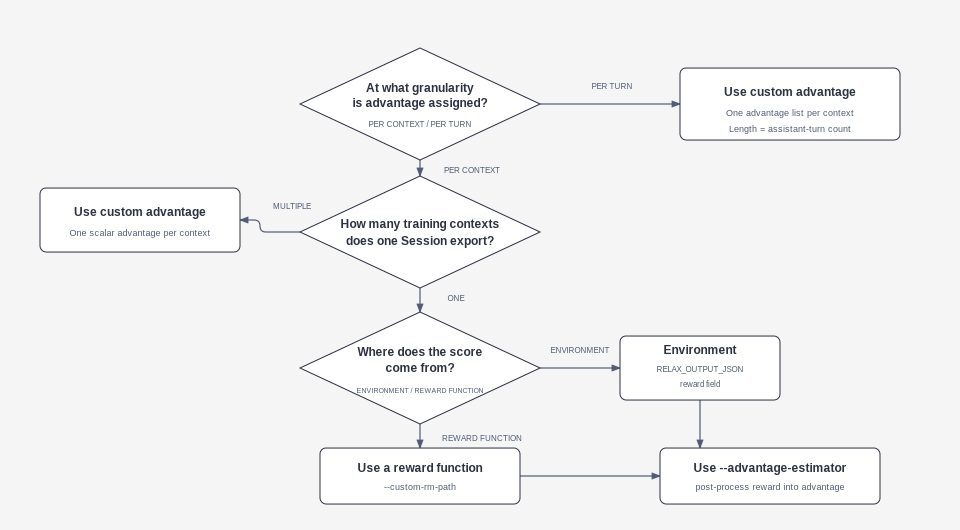
After an Agent completes a task, decide which contexts enter training and how reward/advantage is produced. The common case is one reward/advantage per sample, with its value coming from the environment or a reward function.
| Example | Task score | Training contexts | Advantage |
|---|---|---|---|
mini_swe_agent | Score comes from the environment's test script and is stored in reward | One context | Reward post-processing is selected by --advantage-estimator |
| DeepEyes Agentic | reward_deepeyes.reward_func through --custom-rm-path | One context | Reward post-processing is selected by --advantage-estimator |
| Search-R1 multiagent | Agent-side exact-match scoring stored in export metadata | main + searcher_* | Custom advantage assigns a scalar advantage to each export |
One Training Context
When a Session exports only its final context, Relax uses the recorded conversation directly. If the environment scores the task, write the result to the reward field in RELAX_OUTPUT_JSON. If a reward function scores it, configure --custom-rm-path. To record additional information, put it in the metadata field of the same JSON object. Relax keeps the complete metadata in rollout dumps and reports its top-level numeric fields as metrics to enabled tracking backends such as ClearML and TensorBoard.
{
  "metadata": {"task_success": 1.0},
  "reward": 1.0
}
When reward has one value, write a number. To record several scoring results, use a JSON object and select the field used as the training reward with the following option. Other top-level numeric fields are reported as reward metrics:
--reward-key <primary-key>Use implicit export only for an audited strictly linear history. Any nonlinear history requires explicit export, even when it currently has one exportable leaf.
Explicitly Export One or More Contexts
When a Session's conversation history is no longer strictly append-only, such as in multi-agent workflows or after history compression, it may contain several linear contexts. Explicit export lets users choose which contexts enter training and assign an advantage to each export through --agentic-custom-advantage-path.
Write one JSONL record for each context selected for training to the file named by RELAX_OUTPUT_JSON. For example, a Session that selects main and two searcher contexts writes:
{"name":"main","messages":[{"role":"user","content":"..."},{"role":"assistant","content":"..."}],"metadata":{"outcome":1.0}}
{"name":"searcher_0","messages":[{"role":"user","content":"..."},{"role":"assistant","content":"..."}],"metadata":{"usefulness":0.6}}
{"name":"searcher_1","messages":[{"role":"user","content":"..."},{"role":"assistant","content":"..."}],"metadata":{"usefulness":0.4}}| Field | Required | Meaning |
|---|---|---|
name | Yes | Non-empty name unique within the session; also the custom-advantage key |
messages | Yes | Complete message history used during generation |
tools | When used | Exact tools used by that context |
chat_template_kwargs | When used | Exact template arguments used by that context |
metadata | No | Per-context metrics and inputs for custom advantage |
reward | No | Per-context task outcome; number, object, or null |
Relax trains the records present in the JSONL output; omitted contexts are not trained. For explicit export, keep the agent on Chat Completions and reuse the complete messages, tools, and chat_template_kwargs from generation in each export record so it matches the SessionForest state recorded by Relax.
Multi-Context Training Parameters
When one Session exports several contexts, the training command also requires:
--use-dynamic-batch-size
--max-tokens-per-gpu <token-budget>
This is a batching requirement for multiple physical training rows and is independent of the reward source or advantage granularity.
Export One Context During Eval
Default Eval metrics treat every export as one sample. Exporting several contexts from one Session changes the denominator of the mean reward and disrupts --log-passrate grouping by n_samples_per_eval_prompt. Eval should therefore export one representative context, usually main. Search-R1 multiagent follows this rule: training exports main + searcher_*, while Eval exports only main. Export several Eval contexts only when a custom Eval logger explicitly regroups them by Session.
Custom Advantage
Search-R1 multiagent demonstrates scalar advantages: it exports main and searcher_*, normalizes the main scores across the sampled Group, and assigns one scalar to every export.
Custom advantage uses named explicit export records, even when one Session exports one context.
Configure the function with:
--agentic-custom-advantage-path my_package.advantage.advantage_funcadvantage_func receives the exports from every Session in the current Group. The name and metadata from each JSONL record become a {name: metadata} entry. This minimal example reads the outcome and usefulness fields from the JSONL above, centers the main outcome within the current Group, and produces a scalar advantage for every export:
import statistics
from typing import Any


def advantage_func(
    metadata_by_slot: list[dict[str, dict[str, Any]]],
) -> list[dict[str, float | list[float]]] | None:
    main_scores = [float(exports["main"]["outcome"]) for exports in metadata_by_slot]
    mean = statistics.fmean(main_scores)
    return [
        {
            name: (score - mean) * float(metadata.get("usefulness", 1.0))
            for name, metadata in exports.items()
        }
        for exports, score in zip(metadata_by_slot, main_scores)
    ]
advantage_func returns None or a list aligned with the input Sessions. Item i in that list belongs to Session i and uses the export names from the explicit records.
The advantage for each export can be:
- a scalar, shared by all assistant turns;
- a list with one score per assistant turn. Its length must equal the number of assistant turns.
Relax applies each turn's score to that turn's tokens, while observation tokens receive zero. If the whole function returns None, Relax drops and replenishes the complete Group. Eval does not call advantage_func.
WARNING
Custom advantage bypasses standard reward post-processing such as GRPO Group normalization. Perform any required Group-level comparison or normalization inside advantage_func.
--normalize-advantages is unrelated to GRPO normalization. It applies masked whitening to valid advantage tokens in the data-parallel group after advantages have been produced. GRPO normalization is an earlier reward post-processing step over the sampled Group for each prompt; whether it runs is not controlled by --normalize-advantages.
WARNING
Training uses the values returned by custom advantage. Put every value needed by the function in export metadata. When Eval or reward metrics also need reward, keep the corresponding reward field in RELAX_OUTPUT_JSON.
Metrics and Passrate
rewardprovides task outcomes forrollout/raw_rewardand--log-passrate.- Numeric helper fields in a reward object use
rollout/<field>/mean|median|max|min. - Top-level numeric fields in output metadata use
<field>/mean|median|max|min, without arollout/prefix. - Complete metadata remains available in rollout dumps.
With --log-passrate, multi-context Sessions use explicit export and attach reward to one representative context, usually main. Set its primary reward value to 1 for success or 0 otherwise; for a reward object, --reward-key selects that value. Leave reward unset on sibling contexts. Put any outcome needed by custom advantage in their metadata. In multi-context training, reward reports the task outcome and custom advantage determines each export's advantage.
Background Eval Judging
The built-in Agentic and standard SGLang eval paths can run expensive judges in the background after generating trajectories. Background judging is enabled by default without any flag; pass --disable-eval-async-judge to disable it and wait for scoring. This works with both colocated and separate training/rollout GPUs. Generating eval trajectories still uses the existing policy inference resources, and background scoring must not continue to depend on those resources.
The independent HTTP reward remote_rm uses this mechanism automatically. A custom --custom-rm-path must declare support explicitly. For example, with existing train_reward and eval_reward implementations, the entry point can remain a synchronous function:
def reward_func(args, sample, *, evaluation=False, **kwargs):
    if evaluation:
        return eval_reward(args, sample)
    return train_reward(args, sample)


reward_func.supports_async_eval = True
Synchronous def functions still run in the Ray reward process pool; async def functions can also declare support. The built-in Agentic and standard SGLang rollout paths pass evaluation=False during training and evaluation=True during evaluation, for both inline and background scoring. Functions accepting an evaluation keyword or **kwargs receive the argument; existing strict two-argument functions receive no extra argument. If you implement a complete rollout or eval function, explicitly pass evaluation when calling async_rm / batched_async_rm; Relax does not infer the phase from shared args or metadata. You do not need metadata phase markers or an extra YAML file to distinguish the phases. Configure the evaluation data directly through the CLI:
--eval-prompt-data agent_eval "<eval-data-path>"You can still use --eval-config for dataset-specific sampling parameters or metadata.
Declaring supports_async_eval means eval scoring only needs the exported Sample snapshot, persistent artifacts, and independent CPU or remote judge resources. Export the actions, tool results, and intermediate traces needed for scoring before the Session ends. The scorer must not depend on a live Session, temporary files, or a colocated model that may be offloaded. Return the final real reward; do not submit a background job yourself and return its ID or a placeholder score. The complete-list input and corresponding-list output contract for group_rm is unchanged.
Relax uses a CPU reward pool separate from training scoring, then records metrics and dumps under the original eval iteration once the real scores arrive. Ordinary rule rewards, custom rewards without the declaration, managed dapo-genrm, and native image scoring keep their existing paths. Training rewards are also unaffected by this option. In ordinary RM mode, a reward already supplied by the Agent is reused without another scoring call.
The eval pool for synchronous judges uses --reward-num-workers and --reward-max-concurrency independently of the training pool. Reserve CPU resources for the additional scoring processes.
Normal training completion waits for pending judges and records their results. Background scoring failures are logged and raised during this final drain. This is not a durable job queue that survives the training job: failures or forced shutdown can interrupt scoring. Judges that consistently run slower than eval submission will accumulate a backlog, so set timeouts on remote calls and provision enough scoring capacity. Separate worker pools do not remove contention at a shared remote judge service.
Configure Runtime Behavior
Group concurrency and independent Session generation
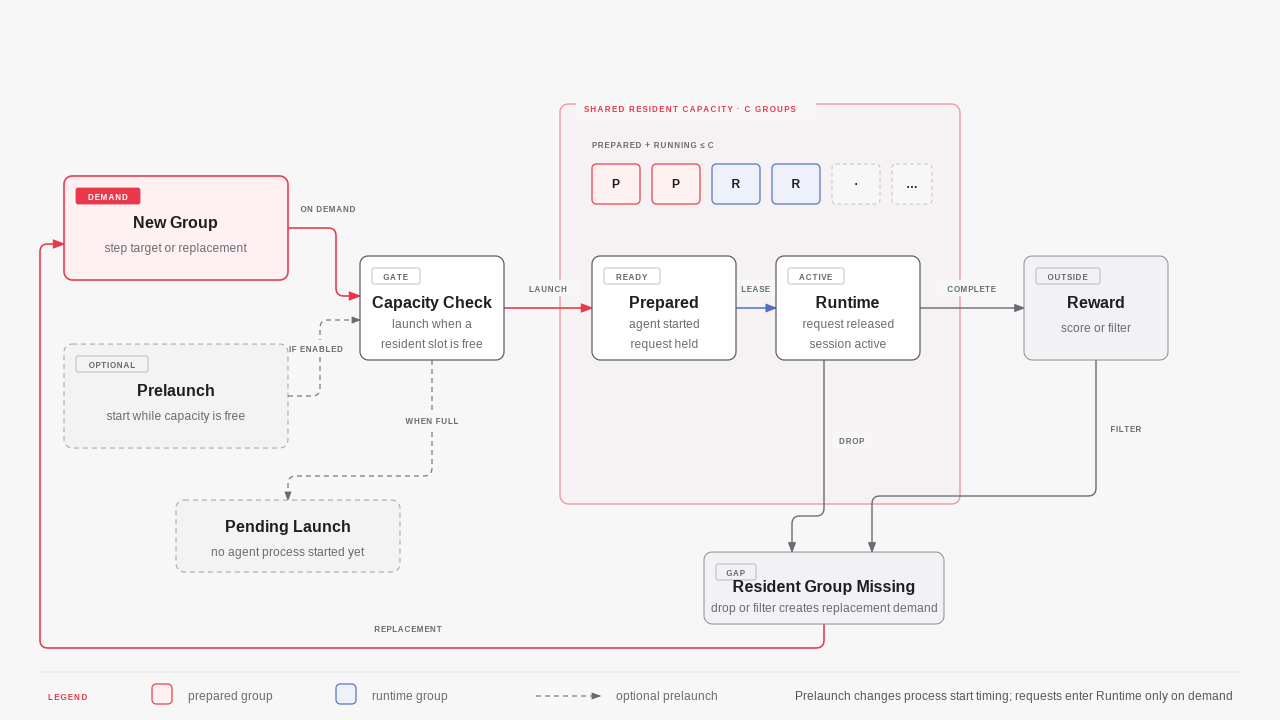
--agentic-concurrency limits resident training Groups across Prepare and Runtime. Its default is --over-sampling-batch-size, which defaults to --rollout-batch-size. Each Group starts all --n-samples-per-prompt original Sessions on one Shard.
A registered Group can receive its Runtime lease before every member reaches its first model request. Each leased member generates when its own request is ready and the generation gate is open. Complete-Group reward, filtering, export, and replenishment still wait for the original Group. Oversampling determines the legal Group launch demand.
Prelaunch retains its existing Group budget. Unleased members wait for lease; ordinary paused members wait for resume. --agent-timeout begins for each member after its first request is ready and its leased generation gate opens. Protected Sessions keep their active timer during a partial-rollout pause. The model client's wall-clock timeout continues while requests wait. Partial rollout, fully async, and dynamic global batch size retain their existing mode constraints.
External executors and Eval
Each Session has 1800 seconds from scheduling its agent process task to issue its first valid inference request, including time spent waiting for an external executor. Receiving that request stops the startup timer, even before the Group is leased; generation still waits for its gate to open. Exiting before the first request or exceeding this deadline drops the whole Group and triggers replenishment. This startup timer is independent of --agent-timeout.
Logical train demand is L = agentic_concurrency * n_samples_per_prompt. For each Eval dataset, let G_d = n_samples_per_eval_prompt; Eval Group concurrency is the explicit --agentic-eval-concurrency, or ceil(L / G_d) by default. Its Session ceiling is E_d = C_d * G_d. Eval datasets run serially.
Eval members also generate independently after lease. Ordinary RM uses singleton Runtime Groups; Group RM keeps the sampled Group size. Both preserve their existing complete export and reward semantics.
For a shared executor, budget at least max(L, max(E_d)) available task slots when training resources are gone before Eval. When prelaunch, partial rollout, or fully async retains training resources during Eval, budget L + max(E_d). Dedicated pools need separate train and Eval budgets. These are logical demand estimates: background cleanup and other jobs can keep additional external resources alive. The external service enforces its physical quotas.
Independent member generation allows ready members to make progress when an executor queues their siblings. It does not resolve application dependencies on work waiting in the same saturated pool. KV controls address another resource; see Agentic KV Scheduling.
Understand How Agentic Rollout Works
Session Lifecycle
One dataset sample creates one Session. The Session owns one agent process, one SessionForest, its rollout mode, and its active-time budget. The process can make sequential or concurrent model API requests. When the process exits, Relax selects the requested Forest states, computes advantages, and sends the samples to training.
The main runtime path is:
Prepare → Runtime → Reward → TransferSessionForest
SessionForest stores every committed conversation state. Different initial histories, tools, or template arguments form different subtrees. A subtree can contain several turns and several branches.
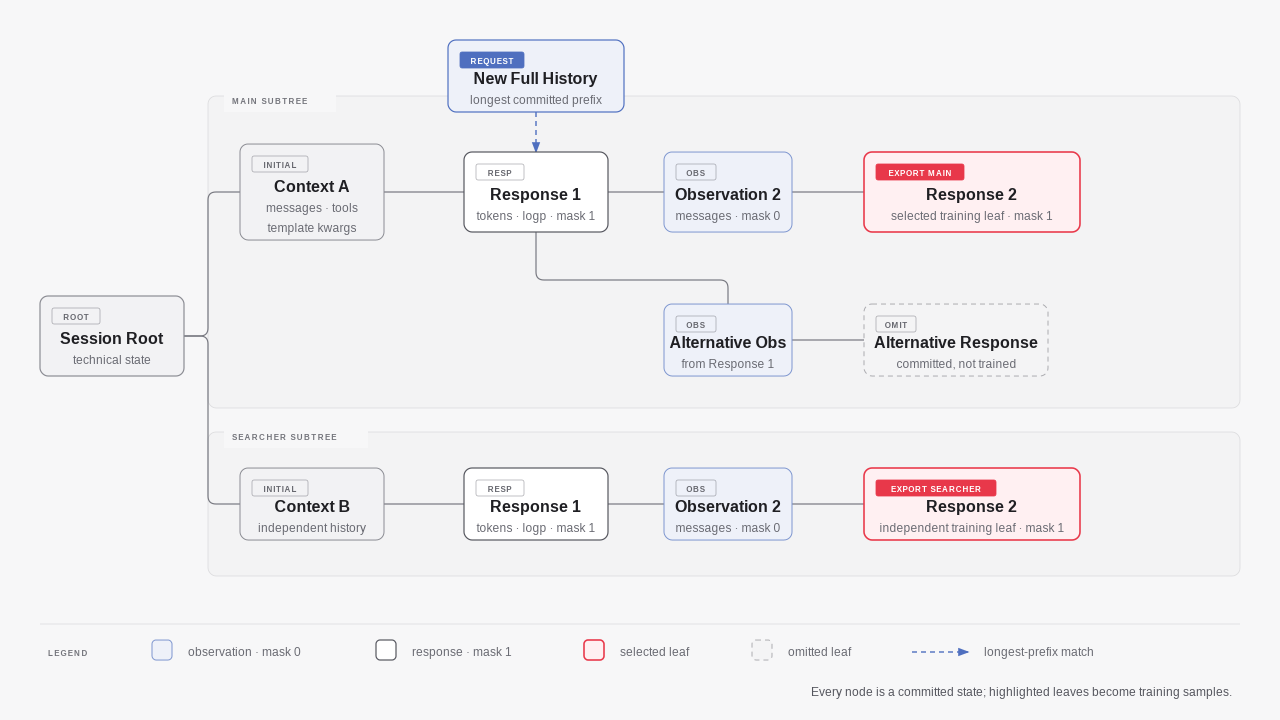
Observation nodes store new system, user, or tool messages with loss mask 0. Response nodes store generated token IDs, rollout logprobs, and trainable loss masks. Multiple requests along one normalized history remain one context. Divergent histories form separate branches. The exported leaves determine the training contexts.
State Identity and Prefix Matching
Every protocol request carries complete history, which Relax projects to canonical messages. Relax finds the longest committed message prefix with the same tools and template arguments. The unmatched suffix becomes a new observation. A full match creates a branch from the existing state. A request with no match starts from the technical root.
Reference implementation
@staticmethod
def _match_parent_state(
    *,
    forest: SessionForest,
    messages: list[dict[str, Any]],
    tools: list[dict[str, Any]],
    chat_template_kwargs: dict[str, Any],
) -> tuple[MsgNode, list[dict[str, Any]]]:
    for prefix_length in range(len(messages), 0, -1):
        prefix_hash = _messages_tools_template_state_hash(
            messages[:prefix_length],
            tools,
            chat_template_kwargs,
        )
        parent = forest.nodes_by_hash.get(prefix_hash)
        if parent is not None:
            return parent, messages[prefix_length:]
    root_state_hash = forest.root_state_hash
    assert root_state_hash is not None
    return forest.nodes_by_hash[root_state_hash], messages
Token and Sample Semantics
Token-in, Token-out
Relax sends the selected lineage's inference token prefix to SGLang. It appends the exact returned token IDs to the inference and training response deltas. This keeps generated tokens, loss masks, and rollout logprobs aligned without retokenizing responses.
Text observations use the same tokenizer IDs for inference and training. Multimodal observations keep tokenizer IDs and media for inference, plus processor-expanded IDs and multimodal_train_inputs for training. Context limits use the processor-expanded training length. New media is stored on its observation node and merged along the exported lineage.
The observation-delta and multi-turn multimodal design is adapted from One Rollout to Rule Them All: Seamless Multi-Turn RL for LLM and VLM.
From a Branch to a Training Sample
initial observation ─ response ─ observation ─ response
       prompt          loss=1       loss=0       loss=1
Relax walks from the exported state to the root and joins the recorded deltas. The initial observation becomes the prompt. Later observations remain in the continuation with loss mask 0. Model responses carry trainable masks and aligned rollout logprobs. An exported lineage must contain at least one committed response.
Runtime Scheduling
Resident Capacity
Prepare and Runtime share the resident Group capacity. Reward work is outside this capacity. A completed or dropped Runtime Group releases its logical slot before best-effort physical cleanup. Filtering creates new Group demand. Tests and rewards run inside the agent belong to its Session lifecycle and differ from the pipeline's Reward stage.
Prelaunch
Prelaunch changes when the agent process starts. It does not change when a request enters Runtime. With prelaunch, the agent can send its first request early. Relax holds that request until the Group receives a Runtime lease.
Cross-Step Retention
Partial rollout and fully async can both keep a Session across rollout steps. The diagram below shows the partial rollout path: SGLang returns a partial token prefix after an abort, Relax parks the request, and a later backend attempt continues the same HTTP request.
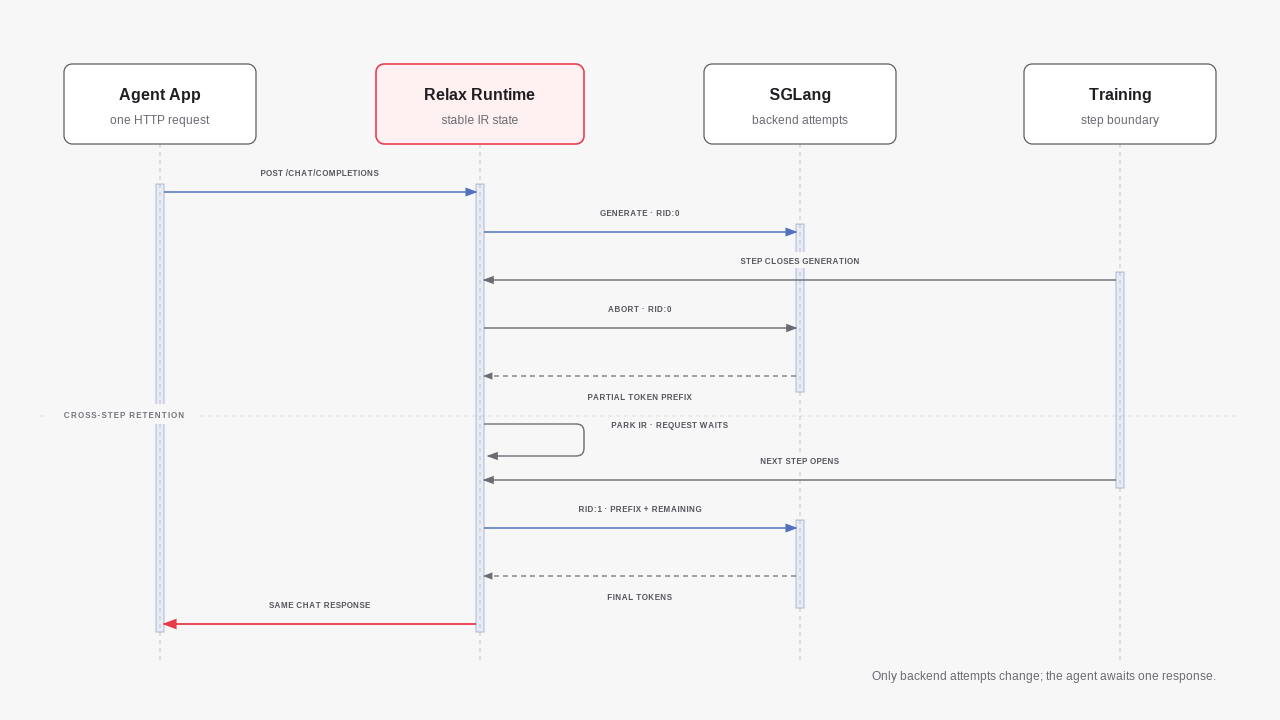
Fully async retention does not require every carried session to follow this exact abort/resume sequence. See Fully Async Training for its partition and backfill behavior.
KV Scheduling
Program-aware admission can delay backend attempts based on predicted KV use. Session lifecycle can release Session radix-cache entries when a session ends. See Agentic KV Scheduling.
Operations and Troubleshooting
Metrics and Dumps
Logical Group counts describe scheduling residency. Inspect the agent or executor's own state for physical process, container, and remote-task occupancy; background cleanup can outlive logical retirement.
Set --save-debug-rollout-data <path-with-{rollout_id}> to save complete metadata, SessionForest state hashes, terminal status, turn count, request timing, abort count, and weight-version information.
Agentic Observability JSONL
Set --dump-agentic-obs <directory> to write manifest.json and sharded JSONL under a generated run_* directory. Collect files from every producing node, or use a shared output directory. Each JSONL row carries schema_version and run_id; sample_export_id is a decimal string, including inside samples[].
| Stream | Records and join keys |
|---|---|
prompts/*.jsonl | Original source row, prompt_id, dataset provenance, raw input_payload, optional reference, and text preview. |
groups/*.jsonl | Runtime Group creation, group_id, group_index, prompt_id, expected Session count, mode, and creation time. |
sessions/*.jsonl | session_id, group_id, prompt_id, sample/replicate indices, expected Group size, and merged sampling defaults. |
trajectories/*.jsonl | Exported lineage, sample_export_id, session_id, runtime group_id, sample_index, and exported_at. Multiple exports share a sample index but have distinct export IDs. |
stages/*.jsonl | Paired stage boundaries with stage_id, record_id, scope, event_seq, occurred_at, and is_terminal. Trajectory stages describe reward, filter and transfer; rollout/update events carry group_ids and groups_finalized. |
train/*.jsonl | One DP fragment per actual policy update: update_id, train_generation_id, stage_id, capture_phase=training_input, samples[], dp_rank, dp_world_size, and input_complete. |
The current train producer covers the Megatron policy actor. An update ID is actor:<rollout_id>:<step_id>, scoped by (run_id, train_generation_id); one rollout may contain several updates. Inputs are captured as micro-batches are consumed, before packing or dynamic CP splitting. Dummy batches are omitted, but real samples with zero loss masks remain. Each sample includes lengths, effective tokens, and masked advantage/return statistics. Train records with schema 4.0.0 encode loss_mask.ranges as zero-based, half-open [start, end, value] intervals over the response. Fill uncovered positions with zero up to response_length. For example, [1, 1, 0, 1] becomes {"ranges": [[0, 2, 1], [3, 4, 1]]}. Train records with schema 3.0.0 store loss_mask as a per-token array. Static CP statistics are null; dynamic CP captures full sequences before splitting. The mask describes training input before loss-local TIS/OPSM filtering.
Identify each DP fragment by (run_id, train_generation_id, update_id, dp_rank) and join by (run_id, train_generation_id, update_id). The actor-group initializer assigns one shared generation ID to a copy of its worker arguments; reinitialization gets a new ID without changing training settings or adding a collective. Input fragments must also match their DP boundary's stage_id, so replayed updates cannot reuse an earlier attempt's input. Missing generation IDs mean unknown. Each DP owner emits paired scope=update_fragment boundaries into stages/actor_<rollout_id>_dp_<rank>.jsonl, including dp_world_size, step_id, train_generation_id, update_sequence, and its local optimizer_successful result. No observability collective runs in training. A training exception records failed/cancelled with unknown optimizer outcome and incomplete membership.
Use relax.utils.agentic_obs.merge_train_updates(stage_records, train_records) on the reader side. It reports committed only when every expected DP owner has one consistent start/end pair and all optimizer results succeeded. Missing or conflicting evidence means unknown; missing train input fragments independently make input_complete=false. It preserves legacy scope=update records unchanged. optimizer_step counts successful updates within each actor-group generation, starting at 1; skipped updates do not increment it. A gap or conflict in the per-DP sequence makes this count null from that point. groups_finalized=true closes membership, not sample success. Runtime group_id and reward-normalization group_index differ.
Custom converters should return aligned CPU int64 sample_export_ids. Missing or invalid identities produce aligned -1 IDs and empty group IDs, without changing training rows or omitting the TQ observation columns; downstream membership and input completeness remain false. IDs are never inferred from input order.
Reward completion and transfer acknowledgement are nonterminal. A TQ RPC failure after submission has reason_code=transfer_outcome_unknown and is_terminal=false, since the remote write may have succeeded. Selection failures and completed Eval exports are terminal. Deduplicate stage events by record_id and order within their scope identity by event_seq, rather than using file order across shards.
The training driver writes its lifecycle to stages/run.jsonl, using scope=run, stage=execution. A start is followed by a terminal completed, failed, or cancelled with the same stage_id and event_seq=2. The terminal occurred_at is the training end time; operation identifies startup, training, or a known checkpoint failure. reason_code is run_failed or run_cancelled, and reason retains the exception type and message or the received signal. Megatron annotates checkpoint errors, including asynchronous save finalization, before they cross Ray. Unmarked failures retain the driver's broader phase; the observer does not guess a phase or quota error from traceback text. The first outcome wins, so a cleanup signal cannot overwrite a completed or failed Run. Existing scope=run, stage=startup records describe the resolved schedule and are not Run outcomes.
Platform consumers should keep three independent states:
| Display | Evidence |
|---|---|
| Training Run | The terminal Run execution event; fall back to the authoritative Trial terminal status when it is absent. |
| Collection freshness | The collector's last successful collection time and its configured freshness threshold. |
| Session | That Session's own execution events, independently of the Run and collector. |
Registration-time Running is not a permanent status. Without a Run outcome or an authoritative Trial result, stale collection means status awaiting confirmation; it cannot establish success, failure, or cancellation. A Run outcome does not prove that all producer files have been collected. SIGTERM and SIGINT record cancellation before remote cleanup; SIGKILL, node loss, and an unwritable observation directory can leave only a start. An ordinary process exit without a recorded result also leaves the outcome unknown. Argument parsing precedes the Run start. Place observation files on storage with independent available quota when checkpoint storage may fill up.
Keep training progress when a Run fails: count distinct committed (train_generation_id, update_id) pairs within the Run, and find participating Sessions by joining their DP input sample_export_ids to trajectory session_ids, deduplicated across updates. Group membership alone does not prove Session consumption. If DP fragments or trajectories are missing, report an observed lower bound or unknown membership, not an exact Session total. This lets a platform display a checkpoint failure alongside its already committed updates and participating Sessions.
Dumps are best-effort. Producers snapshot and enqueue without waiting for disk. Daemon queues bound both items and bytes, including in-flight work. Closure has a one-second total drain budget per recorder/process close, including flush/status; expired or cancelled closes discard pending items. Only the in-flight write retains its resources. At most 16 observation workers can run per process, so repeated recorder creation against a stalled disk cannot accumulate unlimited threads. Observation persistence never shields cancellation or adds a training collective.
Producer *.status.json files expose write/drop counts when writable. Input saturation retains small local optimizer facts through a separate bounded queue; whole-writer failure or abrupt process death can still lose records. Require all DP input fragments with input_complete=true before declaring a complete input set. Missing records, missing log files, unacknowledged export delivery, and partial JSONL tails mean unknown, never proof of a pending or rejected training update. Managed logs snapshot the final 1 MiB locally before temporary-directory cleanup; log_ref names an accepted background write, so readers must check file availability. The manifest uses record_format=agentic-observability-full-v3 and schema 3.0.0. Its train_schema_version identifies the train stream's schema. Readers merge DP facts to determine the update outcome.
Eager and streaming readers preserve source identity before custom prompt processing, templating, filtering, shuffling, or replication. source_row_id is the zero-based physical JSONL line or Parquet row, including sliced/multi-file datasets. dataset_id defaults to the resolved source path; metadata can supply dataset_id, dataset_version, and split. Unknown versions remain null. Prompt IDs hash source provenance and original content: resampling a row preserves identity, while equal content in distinct rows or modified unversioned content produces different IDs. Train and Eval splits have separate identities.
Custom sources can populate Sample.agentic_prompt_source with these provenance and payload fields. Otherwise identity_kind=content_fallback uses a content digest with null dataset/row fields; identical custom inputs cannot be distinguished as separate source rows. Deduplicate prompt and Group inventories by ID within a run. Each driver instance writes separate producer files.
Groups are recorded when fetched, including those waiting for preparation. Session inventory is emitted after launch is accepted, before Shard registration; actual preparation failures also retain their inventory. Deferring a Group to the next step creates neither failed Sessions nor extra replicas. In Eval without group reward, each single-Session runtime Group has expected_group_size=1, although the algorithm's group_index can be shared. sampling_config holds merged Session defaults and overrides; the terminal llm_calls list carries actual request overrides and context caps.
Scoped intervals use one start and one outcome with the same stage_id; their occurred_at values are its boundaries. record_id deduplicates events. event_seq increases across stages for the same scope owner. is_terminal closes the owner lifecycle, independently of closing a stage.
| Scope / stage | Start boundary | End results |
|---|---|---|
| run / execution | Training driver begins startup | completed / failed / cancelled for the whole training Run |
| rollout / execution | A train or Eval scheduling batch begins | completed / failed / cancelled after batch cleanup |
| session / rollout | Driver begins preparation of an accepted Session | completed / failed / cancelled after Shard cleanup |
| trajectory / reward | RM or acceptance of an agent-provided reward begins | completed / failed / cancelled |
| trajectory / filter | A selection or custom advantage decision begins | passed / filtered / failed / cancelled |
| trajectory / transfer | Conversion and queue submission begin | queued_for_train / failed / cancelled |
| update_fragment / train | This DP owner begins the update | completed / failed / cancelled; reader derives global committed/failed/unknown |
Successful transfer uses status=queued_for_train. Earlier dumps used completed for the same acknowledgement; readers can accept that legacy value when stage=transfer. Neither value proves that an optimizer update committed.
filter.operation distinguishes dynamic_filter, custom_advantage, oversampling, shutdown, execution (group disposal), export_delivery, and eval (accepting the Eval result). These are real selection decisions; an instantaneous decision can have zero duration. A provided reward uses reward.operation=provided_reward; a custom advantage path without a reward does not manufacture an RM interval or a zero reward. A shared transfer_batch_id groups the exports submitted in one batch. Unknown queue acknowledgements remain nonterminal and are never automatically retried by the observer. retry_of_stage_id is reserved for explicit business retries; the observer does not add retries.
Session writes only start and its final rollout result: no progress field, phase field, request event, or pause/resume event. Driver owns start; Shard owns the end once registration is attempted. A proven local preparation failure has a paired end and an empty call list. An unknown registration outcome is logged and leaves start open until the Shard supplies an end; the driver does not manufacture a failed end.
| Terminal field | Meaning |
|---|---|
wall_ms / active_ms | Wall time from Driver preparation / managed process active-budget time excluding pauses. Clock synchronization is required across producers. |
llm_calls / llm_calls_complete | Every admitted logical request, including rejected, failed, cancelled and unexported calls; completeness describes captured call/attempt boundaries. |
request_count / attempt_count | Distinct logical requests / entries into backend.generate. Internal HTTP retries are not separate runtime attempts. |
generated_tokens / token_count_complete | Sum of returned deltas, including aborted prefixes and cleanup results. Tokens are null when generation results or internal retries are unobservable. |
export_ids | Published export IDs as decimal strings; empty when no export exists. |
diagnostics / log_ref | Soft cleanup diagnostics / relative queued agent log path, nullable; existence must be checked. |
A call carries request_id, zero-based call_index, started_at, finished_at, status, parent_state_hash, resp_state_hash, and attempts. Runtime attempts carry zero-based attempt_index, rollout_id, both timestamps and status. An aborted partial attempt and a resumed attempt share the logical request ID, even across rollouts. A separately submitted agent request receives a new ID; similarity is not evidence of a retry. Requests rejected before generation have attempts=[]. A length-limited response is a completed call with finish_reason=length, not a failed call.
Request failure does not force Session failure if the agent recovers. Terminal causes include agent_timeout, agent_exit_nonzero, agent_output_invalid, export_validation_failed, session_prepare_failed, session_infra_failed, and session_cleanup_failed. Unfinished siblings and explicit disposal are cancelled with category selection; an already completed Session is never rewritten by later filtering.
To build a Session timeline on the platform:
- Load Session, Group and Prompt by their IDs within
run_id; collect all Session exports. - Expand every DP fragment of
train.samplesand join by export ID to find actual update membership. Group membership alone never proves training consumption. - Collect Session, export and consumed-update stage events; deduplicate by
record_id, then pair bystage_id, verifying scope/owner/stage. Conflicting duplicates or multiple ends are data errors. File order is not event order. - Read calls only from the unique Session end; without it, calls are unknown. Draw each logical call once, nesting attempts and linking
(session_id, request_id)to exportagentic_trace.turns, thenresp_state_hashto lineage. Unexported calls remain visible. - Draw reward/filter/transfer per export; draw each consumed update once. Use
transfer_batch_idfor batch grouping and attempt rollout IDs for batch background, scoped by the Session'srollout_modeto separate train and Eval. - Derive durations only from complete, ordered boundaries. Missing ends remain open; a snapshot time is a display limit, never an observed end. Flag clock inversions. Gaps between LLM calls do not establish tool execution times. Only a committed update proves successful training; require all DP fragments to claim complete inputs.
--dump-agentic-obs-media additionally saves content-addressed media bytes. Without it, data URIs and raw binary payloads in prompts/trajectories become digest/size references. Logs are copied before temporary agent directories are removed; abrupt Shard death can still prevent the final copy. tokens.jsonl remains deferred by the current design.
Common Problems
The agent does not start or exits with an error: check
--agent-cwdand--agent-command, then inspectrun.log. Relax adds a bounded tail of the agent's stdout and stderr toAgentExecutionError.The first request waits: check the Runtime lease, generation pause, backend permits, and executor queue. Use a client timeout that covers these waits. Siblings reaching their first request later do not gate a ready leased member.
External resources remain after a task ends: check that
agent-commandcleans up on natural exit and on SIGTERM from Relax, and inspect executor state. Relax's fallback cleanup logs warnings independently of logical Group capacity.Explicit export does not match: preserve the exact normalized
messages,tools, andchat_template_kwargsused during generation.Implicit export is ambiguous: write named explicit records for the contexts selected for training.
Context length fails after several turns: reduce observation size, completion length, or turn count. The limit uses the complete processor-expanded training lineage.
Examples and Next Steps
examples/search_r1/: text-agent and multi-agent training.examples/deepeyes_agentic/: multimodal tool-use training.examples/mini_swe_agent/: external agent server and sandboxed coding tasks.- Fully Async Training: asynchronous rollout and training.
- Dataset Design: dataset input and metadata.