
Agentic Rollout
Agentic rollout connects an existing agent app (harness) to Relax training. For each Session, Relax starts and supervises an agent process that runs the existing harness. Relax records committed conversations and turns selected contexts into training samples.
Agentic rollout is especially useful when you already have an agent application (harness) that calls an OpenAI-compatible Chat Completions API. Agents using OpenAI Responses or Anthropic Messages can also connect to Relax. The agent may run standalone or through a centralized execution platform.
Recommended workflow
For agent app (harness) assessment, integration, launch checks, and experiments, we recommend using the repository's agentic-rollout skill under skills/agentic-rollout/. It checks the current checkout and guides context topology, parsers, export and credit, timeouts, concurrency, and runtime evidence by stage. Experiments still require explicit user authorization, and this guide remains the contract reference for model API request and response formats, APIs, and export.
For manual reading:
- To start from an existing agent, read Prepare Your Agent, then Connect Your Agent.
- For multi-agent training, exporting several contexts, or defining per-context credit, read Select Training Contexts and Credit.
- To tune concurrency or cross-step execution, read Configure Runtime Behavior.
- To learn how SessionForest and scheduling work, read Understand How Agentic Rollout Works.
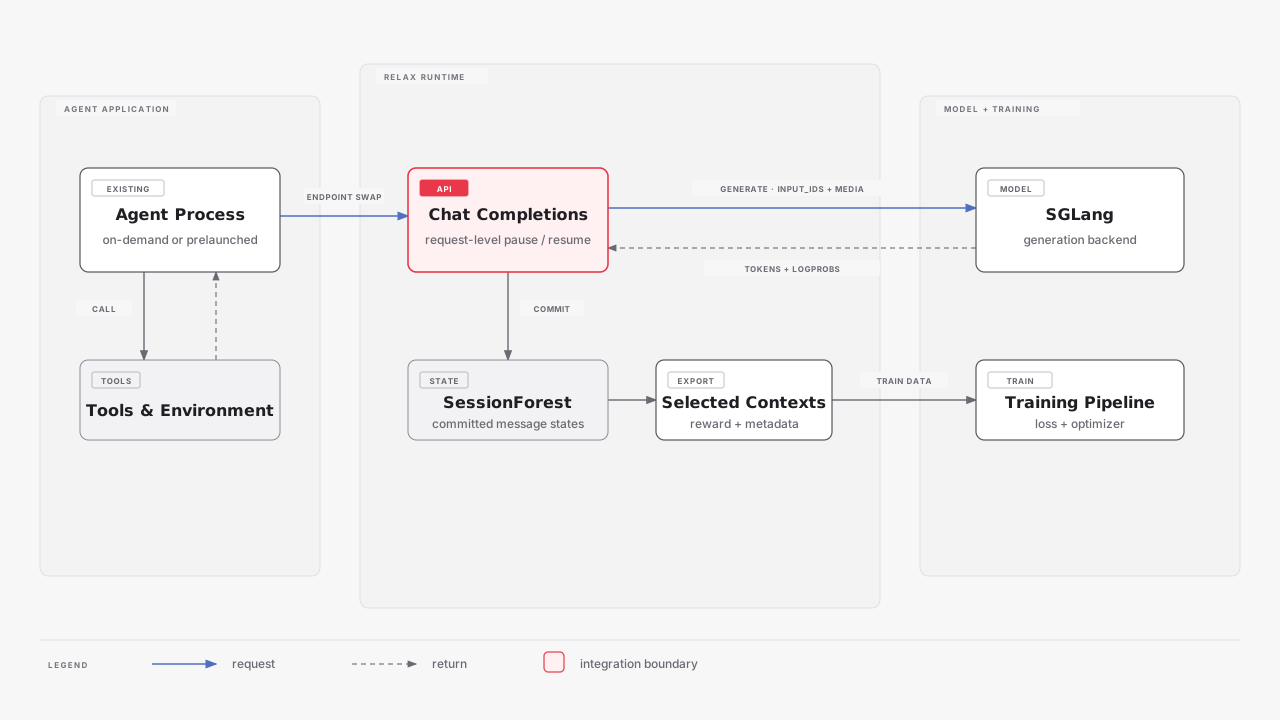
Core Capabilities
Agentic RL with existing agents Connect an existing agent app (harness) through Chat Completions, Responses, or Messages by changing its model endpoint.
Agent process warmup Start agent processes early to hide application, tool, and environment initialization time.
Request-level partial rollout Interrupt and resume model generation across rollout steps without requiring changes to the agent.
Prepare Your Agent
Run the agent outside Relax first. Use its normal task input and model endpoint. Before continuing, confirm that it can:
- accept one real task through its normal input interface;
- call one supported model endpoint;
- complete a full harness run, including multiple turns when needed;
- write a final result;
- exit without an error.
Keep the task input, model endpoint, API credential, and result output configurable. The harness should behave the same after integration. Relax supplies new input, endpoint, and output boundaries around it.
For each Session, Relax starts a process as the agent's entry point. This process can run the agent directly, start child processes, or submit the task to another machine or a centralized platform. Where the agent runs does not matter, as long as its requests reach RELAX_BASE_URL. The process stays running until the task finishes, then exits.
Remote centralized agent platforms
If your agent submits work to a centralized remote platform instead of running directly on the local machine, and that platform limits agent concurrency, you must read Configure Runtime Behavior before launch.
Connect Your Agent
Dataset and Session Input
Relax writes each task to the file named by RELAX_INPUT_JSON. The file can contain messages, metadata, or both. This example provides ready-to-use messages:
{
  "messages": [
    {"role": "system", "content": "You are a helpful research assistant."},
    {"role": "user", "content": "Which city hosted the event?"}
  ],
  "metadata": {
    "task_id": "example-001"
  }
}
Text and Message Input
The standard dataset path maps --input-key to messages. A string becomes one user message. A message list keeps its OpenAI message shape.
Metadata-Only Tasks
--metadata-key maps a dataset object to metadata. A harness can read the task from metadata and construct the messages when it runs.
Multimodal Input
Keep the existing Relax dataset format
Prepare image data in the same way as other Relax multimodal training. Put an <image> placeholder in the prompt or message content, keep the image path, URL, or binary value in a separate dataset field, and map that field with --multimodal-keys. Agentic rollout converts this input to OpenAI image_url format before the agent process reads it.
For example, a dataset row can use the normal Relax format:
{
  "input": [{"role": "user", "content": "<image>Describe this image."}],
  "images": ["/path/to/image.png"]
}
Map the image modality to the dataset field:
--multimodal-keys '{"image":"images"}'Each image in images must have one matching <image> placeholder. The standard Relax data path joins the placeholders with the image values and creates internal image items. Agentic rollout then adds the process-boundary conversion to OpenAI image_url. The dataset itself does not need to store image_url objects. This placeholder and field-mapping path applies to the initial input prepared from the dataset.
| Stage | Image processing |
|---|---|
| Standard Relax dataset path | --multimodal-keys inserts the dataset image into the prompt and extracts model media inputs |
| Agentic Session Input | Before the process starts, Relax converts each internal image item to OpenAI image_url content |
| Agent model request | Relax reads image_url, prepares backend media for SGLang, and builds processor-expanded training inputs |
At the process boundary, an existing data:image/..., http://, or https:// URL is kept. A local path, byte payload, or in-memory image is loaded, converted to RGB PNG, and encoded as a data URI.
Images in messages use the OpenAI image_url content shape:
{
  "role": "user",
  "content": [
    {"type": "image_url", "image_url": {"url": "data:image/png;base64,<base64-data>"}},
    {"type": "text", "text": "Describe this image."}
  ]
}
Initial dataset images arrive in this shape automatically. An agent that adds images in later turns must create the same shape directly in messages; later observations do not go through dataset placeholders or --multimodal-keys. Tool observations can also contain image_url items. See examples/deepeyes_agentic/app/env_deepeyes.py for a complete multi-turn example, and see Token-in, Token-out for the inference and training token views.
Minimal Agent Application
This example receives ready-to-use messages, makes one model call, and exports the final conversation. A metadata-driven harness can construct messages after reading metadata. A real agent can keep its existing tool loop and make more calls with the same client.
import asyncio
import json
import os
from pathlib import Path

from openai import AsyncOpenAI


async def main() -> None:
    session_input = json.loads(Path(os.environ["RELAX_INPUT_JSON"]).read_text(encoding="utf-8"))
    messages = session_input["messages"]

    client = AsyncOpenAI(
        base_url=os.environ["RELAX_BASE_URL"],
        api_key=os.environ["RELAX_SESSION_ID"],
        timeout=9999,
    )
    response = await client.chat.completions.create(
        model="model",
        messages=messages,
    )
    messages.append(response.choices[0].message.model_dump())

    output = {
        "metadata": {"task_success": 1.0},
        "reward": 1.0,
    }
    Path(os.environ["RELAX_OUTPUT_JSON"]).write_text(
        json.dumps(output, ensure_ascii=False),
        encoding="utf-8",
    )


asyncio.run(main())
The timeout=9999 above is the wall-clock timeout for one model request sent to RELAX_BASE_URL. A single request may be held during prelaunch, partial-rollout abort and resume, or fully-async execution, so configure this client timeout to cover the longest such wait.
Keep the complete assistant message returned by model_dump(). Reasoning content and tool calls can then be used by later turns and by SessionForest matching.
Model APIs
Relax accepts Chat Completions requests and the Responses and Messages request shapes described below. All three use the same generation and SessionForest core. Every endpoint authenticates with Authorization: Bearer <RELAX_SESSION_ID>.
| Interface | Endpoint | Complete-history field | Turn limit |
|---|---|---|---|
| OpenAI Chat Completions | /v1/chat/completions | messages | max_completion_tokens, or legacy max_tokens |
| OpenAI Responses | /v1/responses | typed input Items | max_output_tokens |
| Anthropic Messages | /v1/messages | system and messages | required max_tokens |
Sending requests without a standard client
Pass RELAX_BASE_URL unchanged to standard clients; they append their own resource paths. For direct HTTP requests, use RELAX_BASE_URL.rstrip("/") + endpoint, where endpoint comes from the table above. Preserve the existing service path: URL helpers that resolve a leading / from the origin may discard /agentic_api.
Current API limits
Model requests must use HTTP. Omitting stream or setting it to false returns JSON; stream=true uses Buffered SSE and emits model-content events after the complete generation finishes. WebSocket and token-level streaming are not supported. Every request must replay the complete history for its conversation branch. Responses requests must include the complete input; Relax does not use previous_response_id.
Relax normalizes requests from all three interfaces to canonical messages, function tools, and chat_template_kwargs, then uses that state for SessionForest matching and generation. The API response is rendered in the interface used by the request. The model field is echoed in the response and does not select the Relax inference backend. Request fields outside the tables below do not alter generation.
Chat Completions
The training configuration supplies temperature and top_p. Request values for these fields are ignored.
| Field | Behavior |
|---|---|
messages | Required complete history for one conversation branch |
tools | Tool definitions used by that branch |
chat_template_kwargs | Template arguments used by that branch |
max_completion_tokens | Maximum generated tokens for this turn |
max_tokens | Legacy alias for max_completion_tokens; the newer field takes precedence when both are set |
stop | Stop string or list for this turn |
seed | Sampling seed for this turn |
logprobs | Include generated-token logprobs in the response |
Chat Completions message contract
Use user, assistant, tool, or system roles. User, system, and tool messages require nonempty content; represent a tool result of None or "" with a stable nonempty value. Assistant messages may omit text content when tool calls or reasoning are present. Chat developer messages need a harness-side conversion to system. Relax manages add_generation_prompt, tokenize, and tools; do not set them in request chat_template_kwargs.
Pass tools and chat_template_kwargs on every request that uses them. Configure --agentic-reasoning-parser and --agentic-tool-call-parser when the model and chat template require them.
Responses
Relax projects these typed input Items:
| Item | Projection |
|---|---|
Top-level instructions string | Canonical system message before input |
message with user, assistant, system, or developer role | Canonical message; developer becomes system |
input_text / output_text | Message text |
User input_image with an image_url string | Canonical image_url content |
reasoning with readable summary or content text | Assistant reasoning_content |
function_call | Assistant function tool call with the same call_id |
function_call_output with text output | Tool message with the same call_id |
Responses function tools use the flat type, name, parameters, and optional description shape. Output reasoning, assistant text, and function calls become corresponding Responses Items. function_call_output accepts a string or input_text blocks. A length-limited result has status: "incomplete"; other successful results have status: "completed".
Anthropic Messages
Relax projects these Messages blocks:
| Block | Projection |
|---|---|
system string or text blocks | Canonical system message |
User or assistant text | Canonical message text |
User image with URL or base64 source | Canonical image_url content |
Assistant thinking | Assistant reasoning_content |
Assistant tool_use | Assistant function tool call with the same ID |
User tool_result with text content | Tool message with the same tool-use ID |
Messages tools use name, input_schema, and optional description; a missing tool type and type: "custom" are projected as canonical function tools. Anthropic responses use text, thinking, and tool-use blocks with Anthropic stop reasons. stop_sequences is passed to generation as the turn's stop strings.
Buffered SSE
Buffered SSE keeps the HTTP request open while the complete generation runs. Relax sends an initial connection frame and a heartbeat every 15 seconds while generation is pending. After completion, it emits the protocol's complete terminal event sequence together; it does not expose token-by-token deltas.
| Protocol | Terminal sequence |
|---|---|
| Chat Completions | One complete chat.completion.chunk with usage, then [DONE]; failures send OpenAI error data, then [DONE] |
| Responses | response.created, one response.output_item.done per output Item, then response.completed, response.incomplete, or response.failed |
| Messages | message_start, complete content-block events, message_delta, then message_stop; failures use event: error |
Chat and Responses use SSE comments for connection and heartbeat frames. Messages uses event: ping. JSON and Buffered SSE share the same normalized request, generation, SessionForest commit, usage accounting, and finish reason. Every successful Chat terminal chunk includes complete usage, independent of stream_options.include_usage; Relax does not emit a separate usage chunk.
Agent Process Contract
Relax injects these variables into every agent process:
| Variable | Meaning |
|---|---|
RELAX_INPUT_JSON | Session input JSON path |
RELAX_OUTPUT_JSON | Session output path |
RELAX_SESSION_IO_DIR | Per-session temporary directory |
RELAX_BASE_URL | Agentic model API base URL |
RELAX_SESSION_ID | Session ID and API credential |
RELAX_ROLLOUT_MODE | train or eval |
RELAX_GROUP_ID | Runtime Group ID |
The RELAX_ prefix is reserved. A shell launcher can map these values to an existing application interface:
#!/usr/bin/env bash

export OPENAI_BASE_URL="${RELAX_BASE_URL}"
export OPENAI_API_KEY="${RELAX_SESSION_ID}"

python -m my_agent \
    --input-json "${RELAX_INPUT_JSON}" \
    --output-json "${RELAX_OUTPUT_JSON}"
Relax manages the process group created for the launcher. A shell wrapper may use exec to simplify its process tree, but exec is not required. Pass application settings with --agent-env:
--agent-env FOO=bar BAZ=quxLaunch Training
Add these options to a working Relax training command:
--use-agentic-rollout \
--agent-cwd /path/to/agent_repo \
--agent-command "bash run_agent_app.sh"
Use a recipe under examples/ for model, data, parallelism, and algorithm settings.
Verify the First Rollout
When the first rollout step completes, look for accounting_end:
AGENTIC ROLLOUT event=accounting_end rollout=0 ...The progress bar reports completed sessions as scored. At this point an application that exports its final conversation as one training context is ready to train.
Select Training Contexts and Credit
| Contexts exported by each session | Required training credit |
|---|---|
| One context | Write reward, or omit it and configure --custom-rm-path |
| More than one context | Configure --agentic-custom-advantage-path; custom RM is generally discouraged and requires deliberate Group RM review |
Export the Final Conversation
For a single final training context, omit RELAX_OUTPUT_JSON, leave it empty, or write an object with optional metadata and reward. Relax exports the unique committed conversation context. When the output does not contain reward, the training command must configure --custom-rm-path.
{
  "metadata": {"task_success": 1.0},
  "reward": 1.0
}
Use implicit export only for an audited strictly linear history. Any nonlinear history requires explicit export, even when it currently has one exportable leaf.
Explicitly Export One or More Contexts
Multi-agent training is a common use of explicit export. For example, one session can export a main context and several searcher contexts so each receives its own training credit. Explicit export also supports one agent with several conversation branches. Each JSONL record describes one training context, not one agent process. Exporting more than one context requires --agentic-custom-advantage-path.
Write one JSONL record for each context selected for training:
{"name":"main","messages":[{"role":"user","content":"..."},{"role":"assistant","content":"..."}],"metadata":{"role":"main","outcome":1.0},"reward":1.0}
{"name":"searcher_0","messages":[{"role":"user","content":"..."},{"role":"assistant","content":"..."}],"metadata":{"role":"searcher","outcome":1.0}}
{"name":"searcher_1","messages":[{"role":"user","content":"..."},{"role":"assistant","content":"..."}],"metadata":{"role":"searcher","outcome":1.0}}| Field | Required | Meaning |
|---|---|---|
name | Yes | Non-empty name unique within the session; also the custom-advantage key |
messages | Yes | Complete message history used during generation |
tools | When used | Exact tools used by that context |
chat_template_kwargs | When used | Exact template arguments used by that context |
metadata | No | Per-context metrics and custom-credit inputs |
reward | No | Per-context task outcome; number, object, or null |
Each record must match a committed SessionForest state. Include the full assistant messages, reasoning content, tool calls, tools, and template arguments used during generation. Relax trains the records present in the JSONL output. Omitted contexts are not trained.
Explicit export records always use the canonical Chat-shaped messages, nested function tools, and chat_template_kwargs shown above, including when the agent called Responses or Messages. Reuse the normalized values that matched the committed SessionForest state; a raw Responses input list or Anthropic block list is not an explicit export record.
The context count does not depend on the process count. One process can export several contexts. A multi-agent application can export one context or several. Evaluation can export only main while training exports more contexts.
Standard Reward
Standard reward is supported when each session exports one context. Either write reward in the output, or omit it and configure --custom-rm-path. A numeric reward is a scalar outcome. A reward object can contain a primary reward and numeric helper metrics. When reward is an object, configure:
--reward-key <primary-key>Custom Advantage for Multi-Agent Credit
When one session exports several contexts, one task outcome does not say how much training credit each context should receive. Custom advantage turns export metadata into one number for each context.
Put every input used by the function in each export's metadata, then configure:
--agentic-custom-advantage-path my_package.advantage.advantage_funcSuppose the first sampled session writes these explicit records to RELAX_OUTPUT_JSON:
{"name":"main","messages":[{"role":"user","content":"..."},{"role":"assistant","content":"..."}],"metadata":{"outcome":1.0},"reward":1.0}
{"name":"searcher_0","messages":[{"role":"user","content":"..."},{"role":"assistant","content":"..."}],"metadata":{"usefulness":0.6}}
Suppose the second sampled session exports the same names with outcome=0.0 and usefulness=0.2.
Relax builds the function input directly from the contexts exported above:
- each export
namebecomes a mapping key; - that export's final metadata becomes the mapping value;
- the outer list follows the sampled session order in the Group.
Only export metadata is passed through this mapping. The function signature is:
from typing import Any


def advantage_func(
    metadata_by_slot: list[dict[str | None, dict[str, Any]]],
) -> list[dict[str | None, float]] | None:
    ...
The two sampled sessions become this hook input:
[
    {"main": {"outcome": 1.0}, "searcher_0": {"usefulness": 0.6}},
    {"main": {"outcome": 0.0}, "searcher_0": {"usefulness": 0.2}},
]
The return value keeps the same outer order and the same context names:
[
    {"main": 1.0, "searcher_0": 0.6},
    {"main": 0.0, "searcher_0": 0.0},
]
This example gives main the task outcome and gives searcher_0 outcome × usefulness. Metadata field names and credit formulas can differ between contexts.
Output item i always belongs to input session i; the function must not reorder the outer list. Inside one mapping, contexts are matched by name, so dictionary order does not matter. Every exported name needs one numeric value. That value is the training credit for the whole context. 0.0 keeps the context and gives it zero credit. Returning top-level None filters the complete sampled Group; it does not filter one context. An implicit single-context export uses None as its context name. Evaluation does not call this function.
Normalize inside the custom advantage function
The custom path bypasses standard GRPO reward normalization. Standard GRPO normalization has one scalar reward per trajectory and cannot express context roles or turn-level credit structures. Perform every required comparison, centering, scaling, or normalization inside this function. This includes normalization across trajectories in the sampled Group, across contexts or roles, and over turn-level signals stored in metadata. The current function returns one scalar for each exported context, so turn-level signals must be reduced to that scalar before returning.
--normalize-advantages is a separate, later whitening step. It does not replace role-aware or turn-aware normalization inside this function.
What Happens After Custom Advantage
Despite the option name, the returned scalar is the base credit for one context. It is produced before training builds token advantages and before policy-loss corrections. It is not the final loss weight.
export metadata
→ custom advantage and task-specific normalization
→ one base scalar per exported context
→ returns and token advantages, with estimator-specific KL shaping when used
→ optional generic advantage whitening
→ policy ratio and estimator-specific clipping
→ OPSM, TIS, or other off-policy masks
→ entropy, independent KL, and optional distillation terms
→ loss reduction and backpropagation
The word KL can refer to three different downstream operations:
- reference-policy KL used while an estimator builds returns, when that estimator supports KL reward shaping;
- the old-policy/current-policy log ratio reported as
ppo_kland used by policy clipping; - an independent reference-policy KL loss enabled by
--use-kl-loss.
Reward configuration with custom advantage
Generally avoid --custom-rm-path with --agentic-custom-advantage-path. Without --group-rm, the ordinary custom RM path is skipped. A deliberately reviewed Group RM may still write reward for metrics or filtering while custom advantage provides training credit. Store every signal used by the advantage function in export metadata.
Metrics and Passrate
rewardprovides task outcomes forrollout/raw_rewardand--log-passrate.- Numeric helper fields in a reward object use
rollout/<field>/mean|median|max|min. - Top-level numeric fields in output metadata use
<field>/mean|median|max|min, without arollout/prefix. - Complete metadata remains available in rollout dumps.
With --log-passrate, multi-context Sessions use explicit export and attach reward to exactly one representative context, usually main. Set the selected primary reward value to 1 for success or 0 otherwise; for a reward object, --reward-key selects that value. Leave reward unset on sibling contexts. Other contexts can carry the outcome in metadata when the custom advantage function needs it. A Group RM that writes reward to every exported row requires a custom logger that restores logical-Session grouping. In multi-context training, reward reports the outcome while custom advantage provides training credit.
Multi-Context Dynamic Batching
A recipe that may export more than one context from a session must configure --agentic-custom-advantage-path and must enable dynamic batching. Custom RM is generally discouraged; use it only as a deliberately reviewed Group RM for reporting or filtering.
--use-dynamic-batch-size
--max-tokens-per-gpu <token-budget>
Configure Runtime Behavior
Required external-agent capacity
When agents run on a centralized remote platform with a hard concurrency limit, calculate the train limit and each Eval dataset's limit:
T = agentic_concurrency * n_samples_per_prompt
G_d = dataset d's n_samples_per_eval_prompt
C_d = explicit agentic_eval_concurrency or ceil(T / G_d)
E_d = C_d * G_d
E_peak = max(E_d across Eval datasets)
Eval datasets run serially, so their combined peak is E_peak, not the sum of all E_d values.
When --agentic-prelaunch, --partial-rollout, or --fully-async is enabled, select Yes in the Train sessions remain resident during Eval column. Prelaunch shares the training resident capacity, so the train limit stays T; it makes T overlap with E_peak.
Then use the matching row for an executor shared by train and Eval:
| Eval enabled | Train sessions remain resident during Eval | Required slots |
|---|---|---|
| No | — | external_slots >= T |
| Yes | No | external_slots >= max(T, E_peak) |
| Yes | Yes | external_slots >= T + E_peak |
Fewer slots can deadlock Group startup at the all-session first-request barrier. Check this table before starting a run.
| Goal | Option | Behavior |
|---|---|---|
| Limit resident training Groups | --agentic-concurrency | Shared capacity for Prepare and Runtime |
| Set resident Eval Groups | --agentic-eval-concurrency | Logical Eval prompt-Group capacity derived from training capacity when unset |
| Start agents early | --agentic-prelaunch | Starts processes while resident capacity is free |
| Reuse unfinished samples | --partial-rollout | Aborts and resumes backend attempts across steps |
| Run asynchronous rollout and training | --fully-async | Keeps unfinished sessions while partitions advance |
| Limit partial aborts | --partial-rollout-max-aborted-count | Protects a repeatedly aborted attempt |
| Stop an agent that runs too long | --agent-timeout | Terminates the agent process when its Runtime active-time budget expires |
--agent-timeout starts after a Session enters Runtime. It stops an agent that remains active for too long, for example because its loop or a tool call is stuck. A prelaunched Session waiting for Runtime does not consume this budget. The budget also pauses when partial rollout or fully async pauses a Session between steps.
--agentic-concurrency defaults to --over-sampling-batch-size, which defaults to --rollout-batch-size. --agentic-eval-concurrency is derived separately for each Eval dataset from T and that dataset's Group size when unset. Both options count logical prompt Groups. Dataset d owns E_d sessions with either ordinary RM or Group RM; ordinary RM uses singleton Runtime Groups internally without changing that total. Eval datasets run serially, so with dedicated train and Eval executors, provision T and E_peak separately.
Start retrievers, environment servers, and other cross-session services outside the per-session agent command.
Session KV lifecycle and program-aware admission are optional controls for long-running workloads. See Agentic KV Scheduling.
Understand How Agentic Rollout Works
Session Lifecycle
One dataset sample creates one Session. The Session owns one agent process, one SessionForest, its rollout mode, and its active-time budget. The process can make sequential or concurrent model API requests. When the process exits, Relax selects the requested Forest states, computes training credit, and sends the samples to training.
The main runtime path is:
Prepare → Runtime → Reward → TransferSessionForest
SessionForest stores every committed conversation state. Different initial histories, tools, or template arguments form different subtrees. A subtree can contain several turns and several branches.
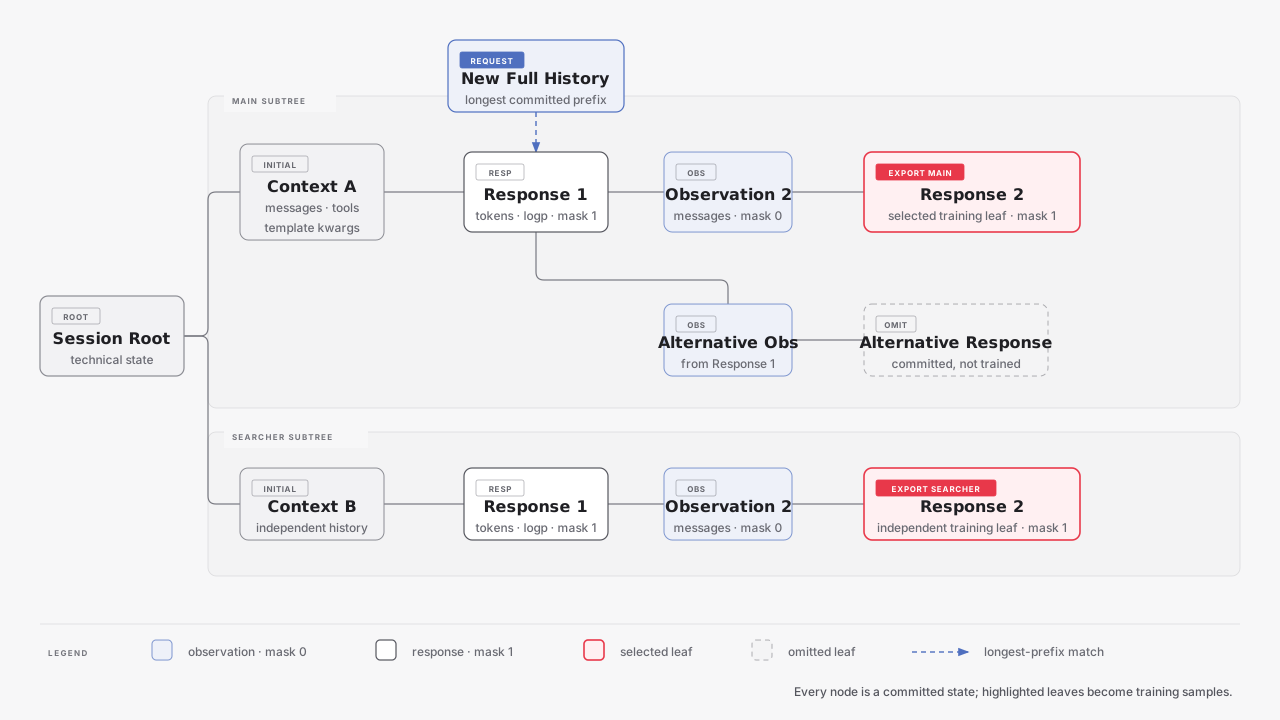
Observation nodes store new system, user, or tool messages with loss mask 0. Response nodes store generated token IDs, rollout logprobs, and trainable loss masks. Multiple requests along one normalized history remain one context. Divergent histories form separate branches. The exported leaves determine the training contexts.
State Identity and Prefix Matching
Every protocol request carries complete history, which Relax projects to canonical messages. Relax finds the longest committed message prefix with the same tools and template arguments. The unmatched suffix becomes a new observation. A full match creates a branch from the existing state. A request with no match starts from the technical root.
Reference implementation
@staticmethod
def _match_parent_state(
    *,
    forest: SessionForest,
    messages: list[dict[str, Any]],
    tools: list[dict[str, Any]],
    chat_template_kwargs: dict[str, Any],
) -> tuple[MsgNode, list[dict[str, Any]]]:
    for prefix_length in range(len(messages), 0, -1):
        prefix_hash = _messages_tools_template_state_hash(
            messages[:prefix_length],
            tools,
            chat_template_kwargs,
        )
        parent = forest.nodes_by_hash.get(prefix_hash)
        if parent is not None:
            return parent, messages[prefix_length:]
    root_state_hash = forest.root_state_hash
    assert root_state_hash is not None
    return forest.nodes_by_hash[root_state_hash], messages
Token and Sample Semantics
Token-in, Token-out
Relax sends the selected lineage's inference token prefix to SGLang. It appends the exact returned token IDs to the inference and training response deltas. This keeps generated tokens, loss masks, and rollout logprobs aligned without retokenizing responses.
Text observations use the same tokenizer IDs for inference and training. Multimodal observations keep tokenizer IDs and media for inference, plus processor-expanded IDs and multimodal_train_inputs for training. Context limits use the processor-expanded training length. New media is stored on its observation node and merged along the exported lineage.
The observation-delta and multi-turn multimodal design is adapted from One Rollout to Rule Them All: Seamless Multi-Turn RL for LLM and VLM.
From a Branch to a Training Sample
initial observation ─ response ─ observation ─ response
       prompt          loss=1       loss=0       loss=1
Relax walks from the exported state to the root and joins the recorded deltas. The initial observation becomes the prompt. Later observations remain in the continuation with loss mask 0. Model responses carry trainable masks and aligned rollout logprobs. An exported lineage must contain at least one committed response.
Runtime Scheduling
Resident Capacity
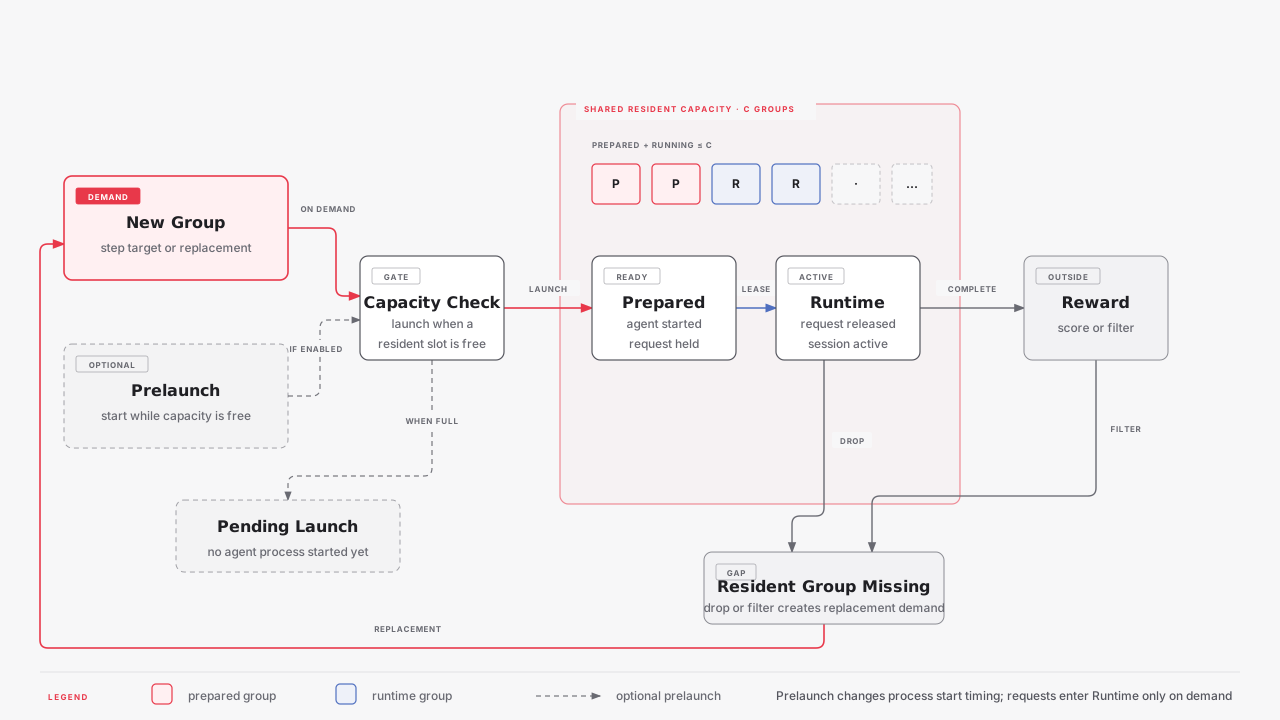
Prepare and Runtime share the resident Group capacity. Reward work is outside this capacity. A completed or dropped Runtime Group frees a slot. A filtered Group creates new demand.
Prelaunch
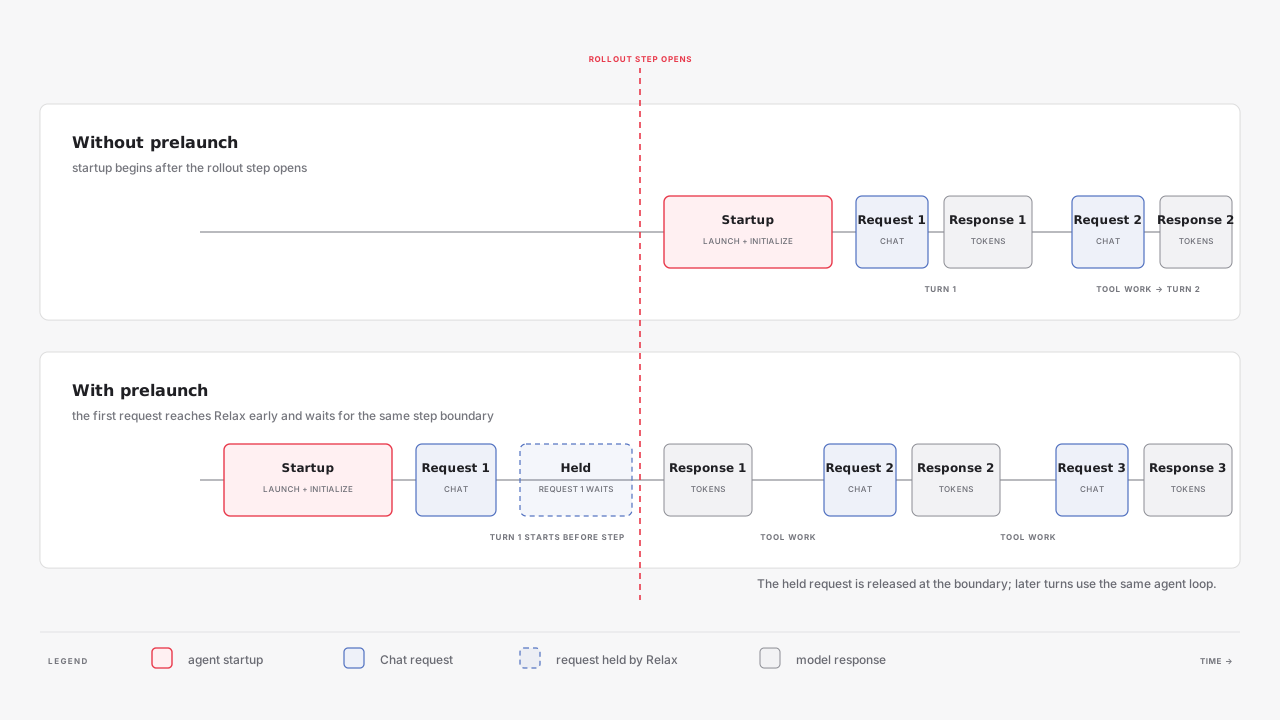
Prelaunch changes when the agent process starts. It does not change when a request enters Runtime. With prelaunch, the agent can send its first request early. Relax holds that request until the Group receives a Runtime lease.
Cross-Step Retention
Partial rollout and fully async can both keep a Session across rollout steps. The diagram below shows the partial rollout path: SGLang returns a partial token prefix after an abort, Relax parks the request, and a later backend attempt continues the same HTTP request.
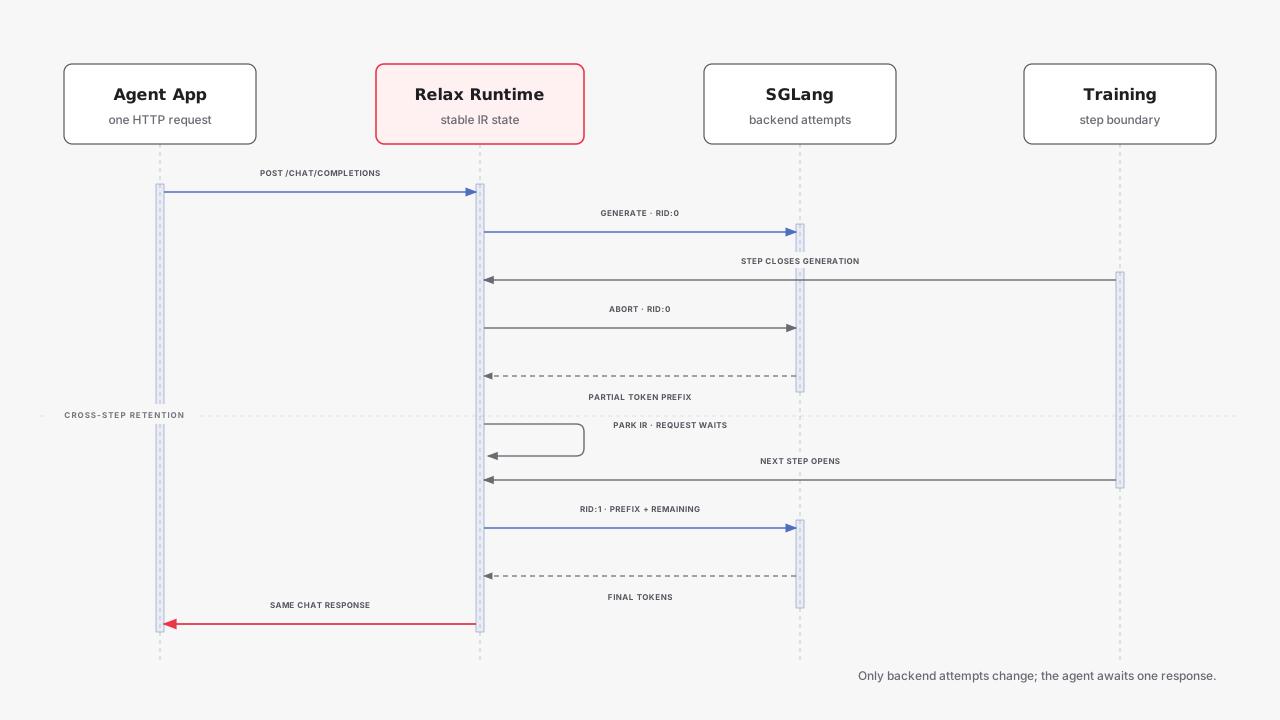
Fully async retention does not require every carried session to follow this exact abort/resume sequence. See Fully Async Training for its partition and backfill behavior.
KV Scheduling
Program-aware admission can delay backend attempts based on predicted KV use. Session lifecycle can release Session radix-cache entries when a session ends. See Agentic KV Scheduling.
Operations and Troubleshooting
Metrics and Dumps
Set --save-debug-rollout-data <path-with-{rollout_id}> to save complete metadata, SessionForest state hashes, terminal status, turn count, request timing, abort count, and weight-version information.
Common Problems
- The agent does not start or exits with an error: check
--agent-cwdand--agent-command, then inspectrun.log. Relax adds a bounded tail of the agent's stdout and stderr toAgentExecutionError. - The first request waits: it is held until the Group receives a Runtime lease. Use a long client timeout.
- Explicit export does not match: preserve the exact normalized
messages,tools, andchat_template_kwargsused during generation. - Implicit export is ambiguous: write named explicit records for the contexts selected for training.
- Context length fails after several turns: reduce observation size, completion length, or turn count. The limit uses the complete processor-expanded training lineage.
Examples and Next Steps
examples/search_r1/: text-agent and multi-agent training.examples/deepeyes_agentic/: multimodal tool-use training.examples/mini_swe_agent/: external agent server and sandboxed coding tasks.- Fully Async Training: asynchronous rollout and training.
- Dataset Design: dataset input and metadata.